


Complete Guide on Large Language Model (LLM). Types, Use Cases, Cost, and UX
When I first encountered the growing pace of Large Language Models (LLMs), I was overwhelmed by their capabilities.
However, as someone who has now incorporated these AI tools into my workflow, the amount of time they save and the tasks they can accomplish takes the upper hand.
I’ve also discovered that while they might seem complex at first, understanding the basics can help you, or anyone, leverage them better in your workflow.
So, in this article, I’ll break down what LLMs are, explore the different types available, and share my personal experiences with various models.
Whether you’re looking to improve your productivity, create content, or simply gain a deeper understanding of LLMs, this guide will help you navigate their features and choose the best model for your needs.
What is a Large Language Model?
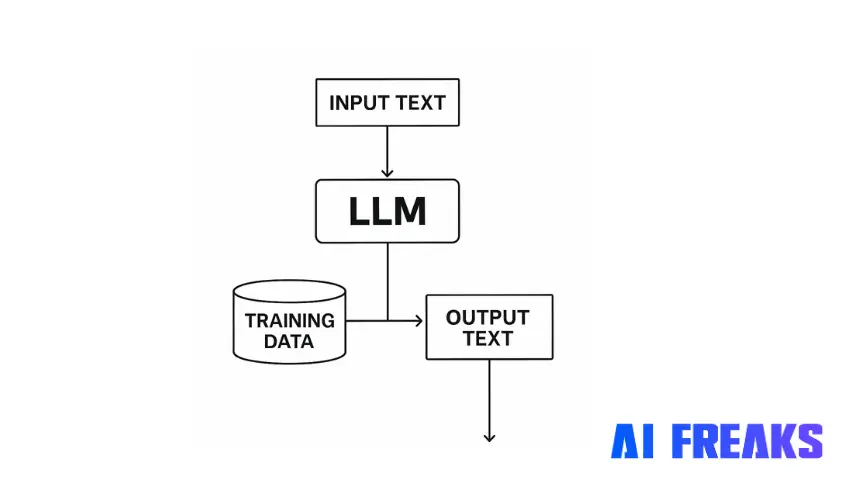
A Large Language Model (LLM) is an artificial intelligence system trained on massive datasets of text to understand and generate human language.
These models use deep learning techniques, specifically transformer architectures, to process and predict text patterns.
In short, they’ve transformed how we interact with technology, making it possible to have conversations with AI that feel increasingly human-like.
When I first used LLMs, I thought of them as a replacement for our traditional search. You know, you didn’t have to Google a term and scour through ads and pages, an LLM could simply save you that effort.
However, they’re much more sophisticated than that. LLMs today can:
- Understand context and nuance in language
- Generate coherent, relevant text across diverse topics
- Generate images based on text-based instructions (Sora, we’re looking at you 👀)
- Translate between languages
- Summarize long documents
- Search and summarize research papers
- Answer questions based on their training data
- Write creative content like ad copies, stories or poetry
- Draft emails, reports, and other professional documents
- Code in various programming languages
What makes LLMs “large” is both the size of their training data (often trillions of words) and their parameter count (ranging from billions to trillions). Parameters are the variables the model adjusts during training to improve its predictions.
What are the Types of Large Language Models?
So, I had to put on my research hat and sift through a lot of documentation for this. However, based on my experience working with various LLMs (and the research), I’ve found that they can be categorized into different types.
Here’s how I break them down:
By Accessibility
- Proprietary LLMs
- Developed by private companies
- Usually accessible through paid APIs or subscription services
- Examples: GPT-4 (OpenAI), Claude 3.7 Sonnet (Anthropic), Gemini (Google)
- Open Source LLMs
- Code and weights are publicly available
- Can be downloaded and run locally or self-hosted
- Examples: Llama 3 (Meta), Mistral (Mistral AI), Falcon (Technology Innovation Institute)
By Size and Capability
- Frontier Models
- These are the largest and most capable models
- Typically require significant computing resources
- Examples: GPT-4o, Claude 3 Opus, Gemini Ultra
- Mid-size Models
- These balance performance and resource requirements
- Suitable for most general applications
- Examples: Claude 3.5 Sonnet, Llama 3 70B, Mistral Large
- Small Models
- More efficient, can run on less powerful hardware
- Often specialized for specific tasks
- Examples: Claude 3.5 Haiku, Llama 3 8B, Phi-3 Mini
By Architecture and Training Approach
- Base Models
- Trained on general text data
- Provide a foundation for other specialized models
- Examples: Most commercial LLMs start as base models
- Fine-tuned Models
- Base models are further trained on specific data
- Optimized for particular use cases or industries
- Examples: Models fine-tuned for medical, legal, or coding tasks
- LLM-RAG (Retrieval Augmented Generation)
- Models enhanced with external knowledge retrieval systems
- Can access up-to-date information beyond training data
- Examples: Many enterprise LLM deployments use RAG
Top LLMs and Their AI Agents (Personal Review)
In my work with various LLMs, I’ve found specific AI agents built on these models beneficial for particular tasks:
GPT-4 and GPT-4o (OpenAI)
- Best AI Agents: ChatGPT Plus, Microsoft Copilot, Perplexity AI
- I’ve found these great for: Creative writing, complex reasoning, coding assistance.
- Cost: $20/month for ChatGPT Plus, varying API costs ($0.01-$0.06 per 1K tokens
Claude (Anthropic)

- Best AI Agents: Claude web app, Claude in Slack, Amazon Q
- I’ve found these great for: Long-context analysis, nuanced explanations, and safety-critical applications.
- Cost: Free tier available, $20/month for Claude Pro, API pricing varies
Gemini (Google)

- Best AI Agents: Gemini Advanced, Gemini in Google Workspace
- I’ve found these great for Research, multimodal tasks (text and images), and integration with Google services.
- Cost: $20/month for Gemini Advanced, some features are free in Google products.
Llama (Meta)

- Best AI Agents: Meta AI, Llama 3 in various applications
- I’ve found these great for: Self-hosting, community innovations, and cost-effective deployment.
- Cost: Free to download and use, but hosting costs vary based on infrastructure
Mistral (Mistral AI)

- Best AI Agents: Le Chat, Mistral API implementations
- I’ve found these significant for Efficient performance on limited hardware and specialized tasks.
- Cost: Free options available, commercial licensing for larger deployments
Perplexity AI

- Best AI Agents: Perplexity Pro, Perplexity Labs
- I’ve found these great for Real-time internet searches, research, and factual answers with citations.
- Cost: Free tier available, $20/month for Perplexity Pro with advanced features
DeepSeek

- Best AI Agents: DeepSeek Chat, DeepSeek Coder
- I’ve found these great for: Technical documentation, programming assistance, mathematical problem-solving
Comprehensive Table of LLMs
Here’s a detailed table of major LLMs available today, based on my research and personal experience:
| LLM Name | Developer | Key Features | Best Use Cases | Cost | Open Source |
| GPT-4/4o | OpenAI | Multimodal, high-reasoning, code generation | Content creation, programming, and research | $20/month (ChatGPT Plus) | No |
| Claude 3.7 Sonnet | Anthropic | Long context, nuanced responses, research capabilities | Document analysis, brainstorming, critical applications, and education | Free tier, $20/month (Pro) | No |
| Gemini Ultra | Multimodal integration with the Google ecosystem | Research, education, Google Workspace integration | $20/month (Advanced) | No | |
| Llama 3 (70B) | Meta | Strong performance, commercially usable | Self-hosting, community projects, and custom applications | Free to download | Yes |
| Mistral Large | Mistral AI | Efficient, multilingual, specialized versions | Enterprise applications, European compliance focus | Custom pricing | Partial |
| Claude 3 Opus | Anthropic | Top-tier reasoning, highly detailed responses | Complex analysis, professional writing, and creative work | Premium tier, API access | No |
| Falcon (40B) | TII | Arab world focus, scientific applications | Research, region-specific applications | Free to download | Yes |
| Cohere Command | Cohere | Enterprise focus, customization options | Business applications, enterprise integration | Custom pricing | No |
| Phi-3 | Microsoft | Small but powerful, efficient fine-tuning | Edge devices, specialized applications | Free for research | Yes (Mini) |
| Mixtral 8×7 B | Mistral AI | Mixture of experts architecture, efficient | Balanced performance and resource usage | Free to download | Yes |
| StableLM | Stability AI | Open weights, community support | Open source projects and experimentation | Free to download | Yes |
| BLOOM | BigScience | Multilingual focus, community-built | Non-English applications and research | Free to download | Yes |
| MPT | MosaicML | Commercially usable, and instruction-tuned | Enterprise deployments and fine-tuning projects | Free to download | Yes |
Secondary LLMs and Specialized Technologies
Lora LLM (Low-Rank Adaptation)

Who is it best for: Developers with limited computing resources wanting to customize existing models
Use case: Rachit Tayal employed LoRA to fine-tune a 7-billion-parameter model in-house using just 1–2 GPUs, achieving cost-effective and privacy-preserving solutions for various generation tasks.
Pros:
- Reduces computational requirements for fine-tuning
- Preserves most capabilities of the original model
- Allows quick adaptation to new domains or tasks
- Small adapter size (typically <100MB)
Limitations to Consider:
- Not a standalone LLM but a technique for adapting existing ones
- Some complex behaviors may be more challenging to change
- Requires technical knowledge to implement effectively
- May still need access to the original model
Manus LLM

Who is it best for: Professionals and individuals looking for an AI agent that’s capable of autonomously handling complex tasks across various domains.
Use case: Manus has been utilized to analyze Tesla’s stock performance, providing valuable insights and reports that help investors make informed decisions.
Pros:
- Versatile in handling diverse tasks
- Capable of autonomous operation
- Excels in complex reasoning and data analysis
- Outperforms competitors in multi-step tasks
Limitations to Consider:
- Still evolving with potential stability issues
- Limited access, currently in beta testing
- Requires user intervention for specific tasks
- Performance may vary depending on task complexity
Anything LLM

Who is it best for: Small teams and individuals looking for a flexible, self-hosted solution
Use case: Anything LLM is ideal for creating a personal knowledge base that can connect to various document sources while maintaining privacy.
Pros:
- Open-source and self-hostable
- Supports multiple model backends
- Built-in document management
- Privacy-focused design
Limitations to Consider:
- Requires some technical setup
- Performance depends on the underlying model
- Community support rather than enterprise
- Ongoing maintenance needed
Open Source LLM

Who is it best for: Developers, researchers, and organizations prioritizing transparency and customization
Use case: For projects with specific data privacy requirements, deploying an open-source large language model (LLM) allows for complete control over data processing.
Pros:
- Full transparency and auditability
- No data sharing with external companies
- Customizable for specific needs
- Often free to use and modify
Limitations to Consider:
- Generally less powerful than leading proprietary models
- Requires technical expertise to deploy
- Higher computing costs for self-hosting
- May need significant fine-tuning
MultiNodal LLM

Who is it best for: Applications requiring understanding across different types of data (text, images, audio)
Use case: Multimodal systems are employed in content analysis projects where the AI needs to understand both images and their descriptions together.
Pros:
- Processes multiple types of information
- More human-like understanding of content
- Can generate or analyze diverse formats
- Creates richer, more contextual responses
Limitations to Consider:
- More complex to implement
- Higher computational requirements
- Still evolving technology
- Less specialized than single-modal systems
Claude LLM

Who is it best for: Enterprise users needing reliable, nuanced responses with strong safety features
Use case: I’ve personally used Claude for brainstorming, editing, and drafting content briefs due to its strength with nuanced responses. It employs a careful and thoughtful approach to complex questions, surpassing other models in its analysis.
Pros:
- Greater text understanding and generation
- Ideal for brainstorming and communicating ideas better
- Handles nuanced instructions well
- Excellent at long document analysis
Limitations to Consider:
- Limited multimodal capabilities compared to some competitors
- Uploads may limit conversation length
- Higher pricing tiers for full capabilities
- Less integrated into existing software ecosystems
Llama LLM

Who is it best for: Developers wanting to build custom applications or deploy on their infrastructure
Use case: Llama models are deployed for internal tools where control over data and the ability to run offline are necessary.
Pros:
- Open source, available for download
- Multiple size options (8B to 70B parameters)
- Strong performance relative to size
- Active community development
Limitations to Consider:
- Requires significant resources for larger models
- Performance gap compared to top proprietary models
- Need for technical expertise to deploy effectively
- Limited official support
Finetune LLM
Who is it best for: Organizations with specific data or domain knowledge they want to incorporate
Use case: Companies like Hugging Face use fine-tuned models to improve domain-specific applications, such as customer service chatbots trained on proprietary datasets.
Pros:
- Customized to specific use cases
- Incorporates proprietary knowledge
- Can reduce hallucinations on domain topics
- Often smaller and more efficient than general models
Limitations to Consider:
- Requires training data preparation
- Technical process to implement
- Can be costly depending on model size
- Risk of overfitting to training data
Janitor LLM
Who is it best for: Data cleaning and preparation pipelines
Use case: Used in AI-driven data pipelines to clean and normalize text before further processing, ensuring better analytics results
Pros:
- Specialized for data cleaning tasks
- Consistent formatting and normalization
- Reduces manual preprocessing work
- Improves downstream analysis quality
Limitations to Consider:
- Highly specialized functionality
- Less suitable for general purposes
- Usually part of a larger workflow
- May require domain-specific training
Falcon LLM
Who is it best for: Researchers and developers seeking powerful open models with flexible licensing
Use case: The UAE’s Technology Innovation Institute utilized Falcon LLM to develop open-source, multilingual NLP applications, particularly for Arabic-language AI tools.
Pros:
- Strong performance for parameter count
- More permissive licensing than some alternatives
- Good multilingual capabilities
- Multiple size options available
Limitations to Consider:
- Less community support than some alternatives
- Fewer specialized variants are available
- Requires substantial resources for larger versions
- Less integration with mainstream tools
Which LLM should I go for?
After working with some and researching other LLMs used across different projects, I’ve found that the right model depends entirely on your specific needs, technical capabilities, and budget.
While frontier models like GPT-4o and Claude 3.7 are more accessible and offer impressive performance, they are not a one-size-fits-all approach.
Many specialized or open-source options can be more practical depending on your use case.
And what impresses me most is how these tools have become increasingly accessible.
To conclude, here’s a simple note to begin your LLM journey.
If you’re just getting started with LLMs, I recommend beginning with user-friendly interfaces like ChatGPT or Claude’s web app before exploring more technical implementations. For developers, experimenting with smaller open-source models can provide insights into whether they fit their specific needs before committing to larger deployments.
At AI Freaks, we help our clients leverage AI to improve productivity, reduce repetitive tasks, and enhance profitability. Want to learn how? Connect with our team of experts!
